Newsletter Advanced
The Mailbeez Newsletter module represents a completely new approach to an integrated eCommerce newsletter function, offering store owners exciting new enhancements, and the ability to create personalized, intelligent email campaigns right from the shopping-cart's admin area.
Responsive Emails
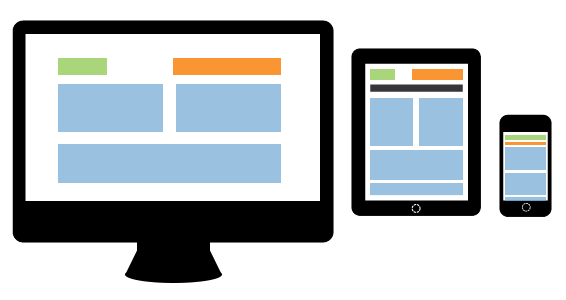 In combination with the responsive template manager you are able to select a responsive email template for this module and adopt it to your design.
You can edit the text without any knowledge of html thanks to the visual editor. What are responsive Emails?
Sending an email newsletter from a standard install of any system variant of OScommerce is a very unappetizing task, which is why there has, in recent years, been a proliferation of 3rd party email newsletter subscribers who have provided the tools that most merchants wished their online shopping-cart system could provide. With the introduction of the Mailbeez Newsletter module, store owners finally have the tools to create email campaigns directly from their admin panel; campaigns that match those of feature rich 3rd party systems.
As a seamless integrated module, the MailBeez Newsletter Advanced Module has direct access to your customer's newsletter subscription setting. This allows you to send a newsletter campaign to all your subscribed customers without exporting or importing any data!
The process of creating and editing a newsletter is very easy: the intuitive visual editor allows you to create professional newsletters that display in the best possible manner across different email clients. In combination with the Responsive Template Manager you will also be able to create mobil-friendly responsive newsletters which will look great e.g. on your customers iPhone.
Free choice of Email-Server
The open and conversion rates of your bulk mailings are strongly dependent on the sending email server. MailBeez allows you to either send the generated emails through your shopping-cart's host server's email function, an SMTP server of your choice, or the certfied email servers of our partner Newsletter2Go.
Powerful segmentation rules
Thanks to the seamless integration of MailBeez with your shopping-cart system, the Newsletter Advanced module has access to all existing data. The built-in segmentation engine allows you to build customer segments based on purchase behaviour and other parameters, (geographic, demographic) to personalize your bulk mailings!
The powerful segmentation rules allow you to create a virtually endless number of targeted newsletter campaigns:
Examples:
Upsell / Cross-Sell
- segmentation: customers, who purchased product x, but not product y
- coupon: free shipping within 7 days.
Last year's 1-time holiday shoppers
- segmentation: 1 purchase between 1st of october 2012 and 31st of december 2012
- coupon: 10% off, valid for 14 days
season newsletters to all customers
- pre-program your season newsletters
- no segementation
welcome newsletter series
- segmentation: customer since x days, but less than y day
Product recall / warning email
- segmentation: customers, who purchased product x, regardless of their newsletter subscription status
Features
Unified Contact Management for customers and prospects
- Capture customer opt-ins and prospect contacts with SiteBeez Newsletter Registration
- Target customers and prospects individually
- Automatic handling of customer and prospects contacts
- Prospects are moved to customers once they sign up
Topics
- Manage unlimited Topic Areas
- configure Topic Areas as public/private
- Topic Areas can be assigned through the subscription form / API
- Customers can manage public Topic Areas, just place a link with href="
[[$config_url]]"
Lists
- create, edit and delete lists for recipients
- unlimited number of lists
- segmentation of lists
- test of segmentation
- export lists e.g.e for Facebook Custom Audiences
Segmentation features
Customers
- geographic: country, state, zip-code
- customer: gender, customer since min/max days, customer groups: requires Customer Group-Filter
- products: purchased / must not have purchased (whitelist/blacklist)
- categories: purchased / must not have purchased (whitelist/blacklist)
- orders: max. number of orders, last order before / after date
- configure countries to ignore customer subscription status for
- Topic Areas
Prospects
- Topic Areas
Campaigns
- create, edit and delete campaigns
- unlimited number of campaigns
- a campaign can hold unlimited number of newsletters
- assign default list for campaigns (can be overridden on newsletter level)
Newsletters
- active from / to date
- select list or you campaign default
- select coupon template
Coupons
- utilising the MailBeez coupon engine
- create coupon templates utilising all available options
- automatically generate personalised coupons
- configure the length and number of days being valid
Reports
- fully integrated with MailBeez Analytics and Google Analytics
- analyse open, click, order
More Information
Sending process
Newsletter can be sent either manually or automatically. With each run, the sending process will send the number of emails you configured as "chunk size". So you will need to run the sending process until the complete list has been sent.
Configuration example for automata sending:
Set up a cronjob (e.g. all 5 minutes), which exclusively will work on the newsletter modules::
wget -O - -q -t 1 <cronurl>\&module=mb_newsletterchunk size:
100 emailsSimple throttling (additional module):
3600 emails per hourThe sending process will send out 100 emails per run, approx. one email per second. The Cronjob starts the sending process every 5 minutes (12 times per hour), so it will send out 1200 emails per hour.
Depending on your mailserver you can increase the sending throughput or you can decrease it.
Thanks to throttling and limiting the number of emails sent per run (chunk size), you can stay within the limits given by your hosting service or email server. Also, this helps to reduce the risk of getting flagged as a spam sender.
Customize the export
By default the list export contains following columns:
'id', 'email','firstname', 'lastname', 'blocked'To extend these columns place a php file e.g. my_nl_export.php in mailhive/common/local/ with following functions - you just need to implement the functions to add the required information for each recipient.
<?php

function mh_nl_export_addon_fields()
{
    // define columns
    return array('gender', 'zipcode');
}

function mh_nl_export_addon_content($recipient_id)
{
    // retrieve data by columns
    return array("g_$recipient_id", "z_$recipient_id");
}
Recommended modules
For best operations we recommend following modules, which will enhance the MailBeez platform. So all other MailBeez modules will be enhanced.
To create and send responsive Emails you need to install the Responsive Template Manager:
Future developments
- additional Email-templates
- additional content templates
- Insert MailBeez Template-Tags with buttons (currently only firstname & lastname)
- DONE: automatically create product content blocks
- DONE: personalised contents
- DONE: Support for "prospect": Visitors can sign-up for the newsletter. Once they convert into a customer the system will recognise it. That allows to sent different newsletters to prospects and customers.
Compatibility
This module is compatible with following shop systems
Gambio GX2/GX3/GX4
Modified-Shop 1.x/2.x/3.x
ZenCart 1.3.x/1.5.x
osCommerce 2.x coupon system required
MailBeez.io API V2
Changelog
v4.9.21
15.01.2024
v4.9.20
28.11.2023
-
- CRM pad search
- refactoring
-
- follow-up emails for prospect lists based on xtcommerce source does not work
v4.9.19
19.07.2023
v4.9.17
16.05.2023
v4.9.16
15.05.2023
-
- source "Abandoned Carts" - target cart abandonment with advanced segmentations
-
- introducing setting to control smart list behaviour - check if recipient is part of the initial list
v4.9.15
02.05.2023
-
- support segmentation by unknown gender
- refactoring
- update templates for product hero and new product with new layout elements
v4.9.14
24.03.2023
-
- refactoring product segmentation builder
- added missing translation strings for follow up delay help
- contact search: include customers w/o customers_info entry
v4.9.13
22.03.2023
v4.9.12
16.03.2023
v4.9.11
09.03.2023
v4.9.10
08.03.2023
-
- PHP8.2 compatiblity
- GUI niceties
- inherit list is no longer supported as this causes issues
- when creating a newsletter the user is guided to the list selection
- when creating a newsletter title and description are pre-filled
v4.9.9
06.02.2023
v4.9.8
25.01.2023
v4.9.7
24.01.2023
-
- prospect list edit view: open customer insight
- prospect list edit view: GUI improvements
- logic to determine if module should run
v4.9.6
23.01.2023
-
- source "non subsriber" - all customers without optin
-
- re-import of prospect lists updates now confirmed status, gender, language
- prospect list edit view: empty lists no longer show endless reload
- layout
v4.9.5
17.01.2023
v4.9.4
17.01.2023
v4.9.3
05.01.2023
-
- allow to preset topic ids when opening signup form through url
-
- more robust assignment of topic areas with prospect import
v4.9.2
28.11.2022
v4.9.1
25.11.2022
v4.9.0
14.10.2022
v4.8.10
15.09.2022
v4.8.9
03.12.2021
v4.8.8
03.12.2021
v4.8.7
06.07.2021
v4.8.6
10.06.2021
v4.8.5
25.05.2021
-
- importing a customer email address will only update the status customers_newsletter when the confirmed status is set through the import
v4.8.4
17.05.2021
v4.8.3
17.05.2021
-
- contact import shows number of invalid data rows
- contact import does not require confirmed column to update topic areas
v4.8.2
29.03.2021
-
- sitebeez signup widget utilizes configured url to privacy policy
- sitebeez signup widget: removed focus border from consent toggle
v4.8.1
10.03.2021
v4.8
12.01.2021
v4.7.01
26.11.2020
v4.7.0
23.10.2020
v4.6.3
13.10.2020
v4.6.2
22.06.2020
v4.6.1
27.05.2020
v4.6.0
19.05.2020
v4.51
22.11.2019
v4.5
21.11.2019
v4.47
30.04.2019
v4.46
04.04.2019
v4.45
01.04.2019
-
- no april fool: when re-importing prospects into topic areas no additional entry is generated
- more robust CSV importer
v4.44
11.03.2019
v4.43
04.02.2019
v4.42
17.01.2019
v4.41
20.12.2018
v4.40
20.12.2018
v4.39
19.12.2018
v4.38
18.12.2018
v4.37
18.12.2018
-
- move newsletter to different campaign
-
- allow delete campaigns only for empty campaigns
- query improvement
v4.36
18.12.2018
v4.35
17.12.2018
v4.34
14.12.2018
-
- lists: show where the list is used
-
- only un-used list can get deleted
- offer to copy newsletter in unlock warning
v4.33
14.12.2018
-
- copy newsletter
-
- follow-up emails for prospect newsletter
- GUI enhancments
- workflow
- protection to change list types (customer / prospects) as this would cause issues with follow-up emails
- warning when re-opening a newsletter
v4.32
07.12.2018
v4.31
07.12.2018
v4.30
07.12.2018
v4.29
23.11.2018
v4.28
23.11.2018
v4.27
23.11.2018
v4.26
22.11.2018
v4.25
15.11.2018
v4.24
13.11.2018
v4.23
07.11.2018
v4.22
06.11.2018
v4.21
23.10.2018
v4.2
23.10.2018
-
- Segmentation by order status
- Segmentation referencing orders option allows to repeat same email after each order
-
- Segmentation Engine
v4.16
09.10.2018
v4.15
09.10.2018
v4.13
04.10.2018
v4.12
04.10.2018
v4.11
26.09.2018
v4.1
24.09.2018
v4.043
17.08.2018
v4.042
09.07.2018
v4.041
06.07.2018
v4.04
05.07.2018
v4.03
05.07.2018
v4.02
01.07.2018
v4.01
28.06.2018
v4.0
28.06.2018
-
- SiteBeez widget for lead generation
- Signup form based on BS4 with consent text and toggle
- GDPR Export modules
-
- refactoring
v3.994
31.05.2018
v3.993
28.05.2018
v3.992
28.05.2018
v3.991
26.04.2018
v3.99
20.03.2018
v3.98
16.03.2018
v3.97
20.02.2018
v3.96
20.02.2018
v3.95
13.02.2018
v3.94
01.11.2017
v3.93
04.10.2017
v3.92
01.04.2017
v3.91
01.04.2017
-
- date campaigns are active the day after the set date
- general setting to only contact newsletter subscribers collides with list segmentation
v3.9
22.02.2017
-
- Segmentation rule relative last order timeframe (e.g. last order between 5 and 10 days ago) allows automatic follow up on purchased products
v3.83
10.02.2017
v3.82
10.02.2017
-
- visual editor
- PHP7.1 compatibility
-
- include customers w/o purchase option generates SQL error in some cases
v3.81
05.12.2016
v3.80
05.12.2016
v3.79
23.11.2016
v3.78
22.11.2016
v3.77
18.10.2016
v3.76
14.10.2016
v3.75
11.10.2016
-
- redesign of dialogs
-
- auto install of filter with every update
- security token zencart and modified-shop 2
v3.72
11.10.2016
-
- public api for newsletter topics configuration webview
- New template placeholder
{$config_url}containing link to topics configuration webview
example:{if $config_url}<a href="{$config_url}">Edit your Topic areas</a>{/if}
-
- refactoring
v3.71
10.10.2016
-
- upper limit of virtual customerid for prospects (id range between 10.000.000 to 11.000.000)
-
- smarty 2.x compatibility issue
v3.70
10.10.2016
-
- customer insight view for finding customers and prospects
- admin gui for opt-out of
- enduser gui for managing topic areas
- admin gui for managing topic areas (Customer Insight)
- progressive data collection for prospects (only email given? -> ask for name on double-opt-in confirmation page)
-
- MailBeez Analytics Pro support
- Newsletter topic areas / categories can be configured to be public or hidden for customers
- webview refactoring to bootstrap
v3.69
26.09.2016
v3.68
18.09.2016
v3.67
13.09.2016
v3.66
09.09.2016
v3.65
09.09.2016
-
- Missing argument 1 for mh_objectInfo::__construct()
- Search for products with special character in name failes
v3.64
01.09.2016
v3.63
28.08.2016
v3.62
16.08.2016
v3.61
15.08.2016
v3.6
11.08.2016
-
- source "all customers" - no check for subscription by default
- newsletter topic areas / categories for customers and prospects
-
- adopted naming of existing source
v3.52
05.07.2016
v3.51
05.07.2016
v3.5
30.06.2016
-
- coupon expire days can be set per newsletter
- public api for adding subscriber
- public api for confirmation of subscriber
- submodules for subscriber opt-in (customers, prospects)
- submodules for subscriber opt-in confirmation emails (customers, prospects) with coupons (optional)
v3.4
13.06.2016
-
- preheader support
-
- email preview from overview
- PHP7 refactoring
-
- fixed issue with multiple active newsletters during sending process: the coupon configuration for all newsletters is overwritten by the last newsletter
v3.3.3
25.04.2016
v3.3.2
01.04.2016
v3.3.1
01.04.2016
v3.3
16.03.2016
v3.25
02.03.2016
v3.24
18.02.2016
v3.23
18.08.2015
v3.22
28.04.2015
v3.21
23.03.2015
v3.20
12.02.2015
v3.13
06.02.2015
v3.12
30.01.2015
v3.11
30.01.2015
v3.10
01.12.2014
v3.05
28.11.2014
-
- improved prospect signup form
- added signupform_modern
- improved handling of prospects / customers
-
- several minor bugs
- file permissions
v3.0
03.11.2014
Found errors? Think you can improve this documentation?
edit this page